



Brandcave · Feb 2024 – Apr 2025
SynkedUp
Redesigning the proposal system for landscape contractors
- In short
- Redesigned a cluttered proposal tool for landscape contractors with clearer groupings, tiered pricing and a modern design system.
- My role
- Junior UX designer, with a senior designer
- Timeline
- 4 months
- Focus
- B2B SaaS, Desktop, Enterprise workflows
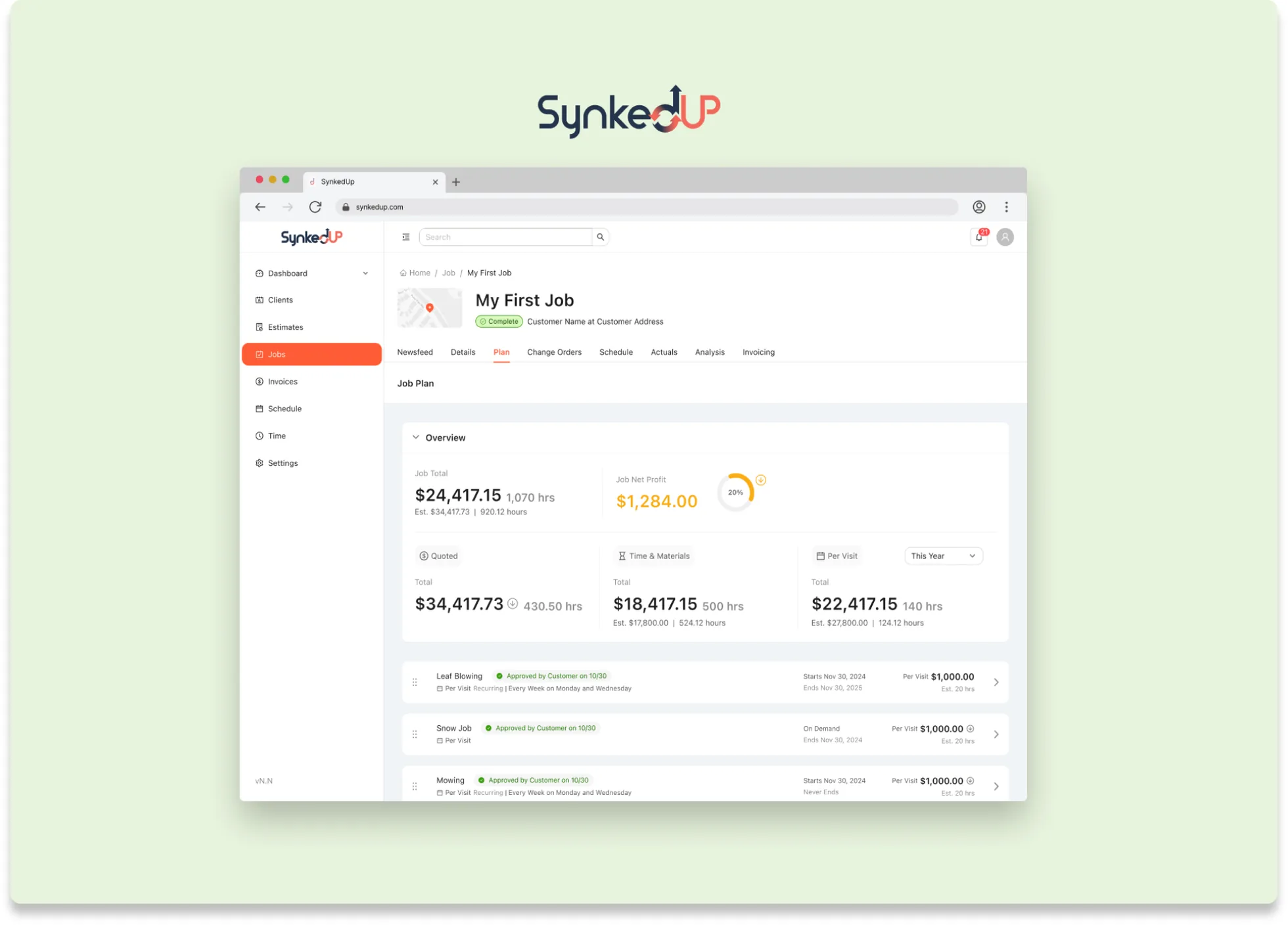
I worked as a junior designer on SynkedUp’s proposal system redesign, a complex B2B workflow where landscape contractors scope work, negotiate with clients, and convert estimates into profitable jobs. Working under a senior designer over 4 months, I helped redesign the estimate creation, proposal management, and approval workflows while learning to design component systems that work within technical constraints.
Context
Context
Contractors win or lose money on their estimates.
SynkedUp is a B2B platform for landscape contractors with a clear mission: help contractors “know their numbers” so they always profit on jobs.
One of the industry’s challenges is that landscape work is estimated upfront, but real costs only emerge during the job. A backyard renovation might involve 20+ tasks: excavation, plumbing, electrical, hardscaping, irrigation, and planting. Each task has different labor rates, material costs, and timing. Contractors who can’t track these costs accurately lose money on jobs, even when they’re busy.
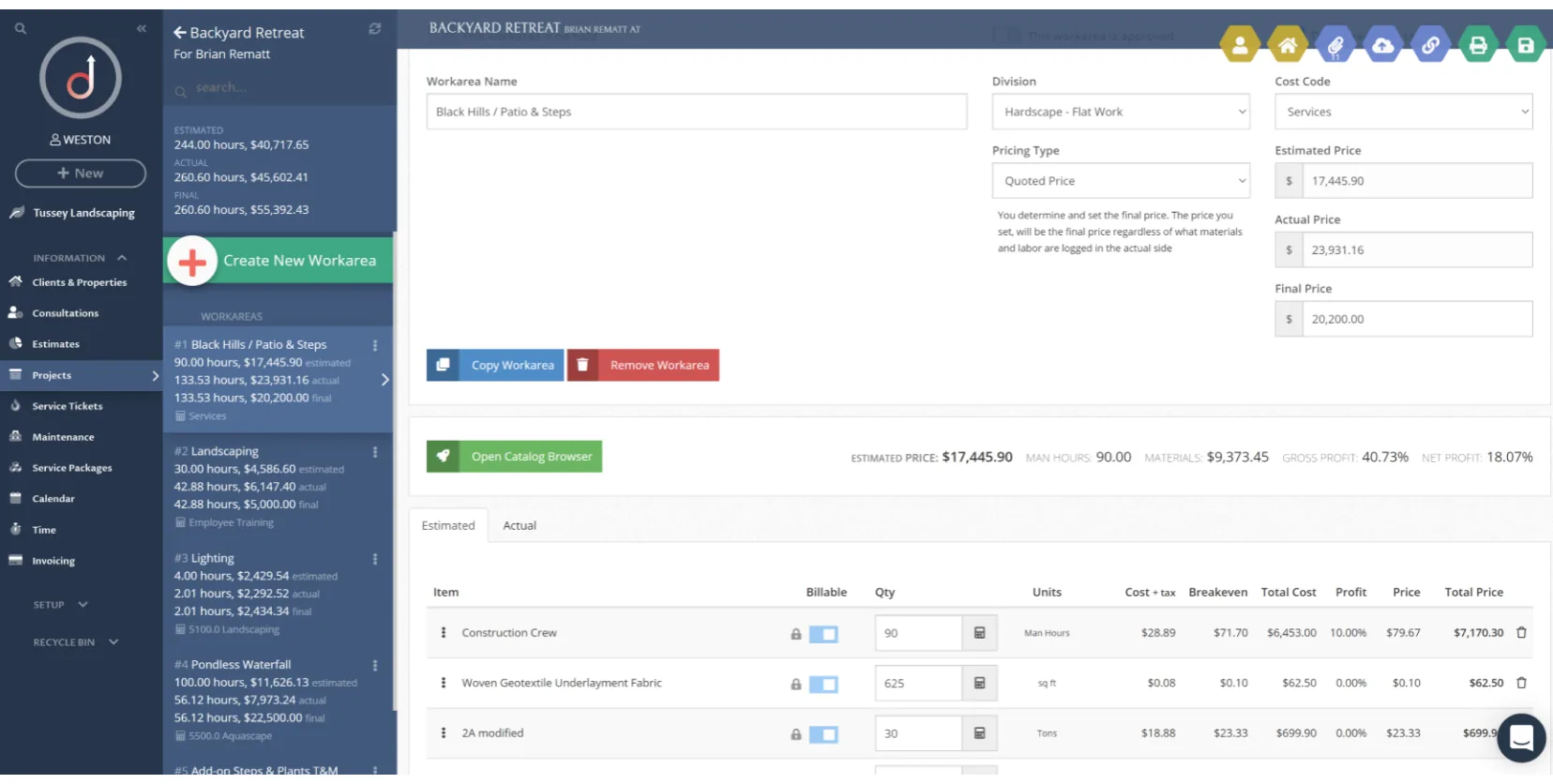
SynkedUp’s proposal system is where contractors scope work and negotiate with clients. If they get this wrong, they either under-bid (losing money) or over-bid (losing the sale). The existing system was successful and had built a community of returning users, but in building for pure functionality, it had accumulated significant design debt. Organizing complex projects got harder as the screen became increasingly cluttered.
Problem
The problem
No way to organize big jobs, and pricing clients couldn’t verify.
SynkedUp’s estimate and proposal system had two critical UX failures.
No hierarchical organization. Estimates were long lists of work areas: a backyard renovation might have 20+ items in one overwhelming list. Contractors couldn’t group related work areas together (all pool tasks under “Pool,” all patio tasks under “Patio”), which made estimates hard to scan internally and hard to present to clients in an organized way.
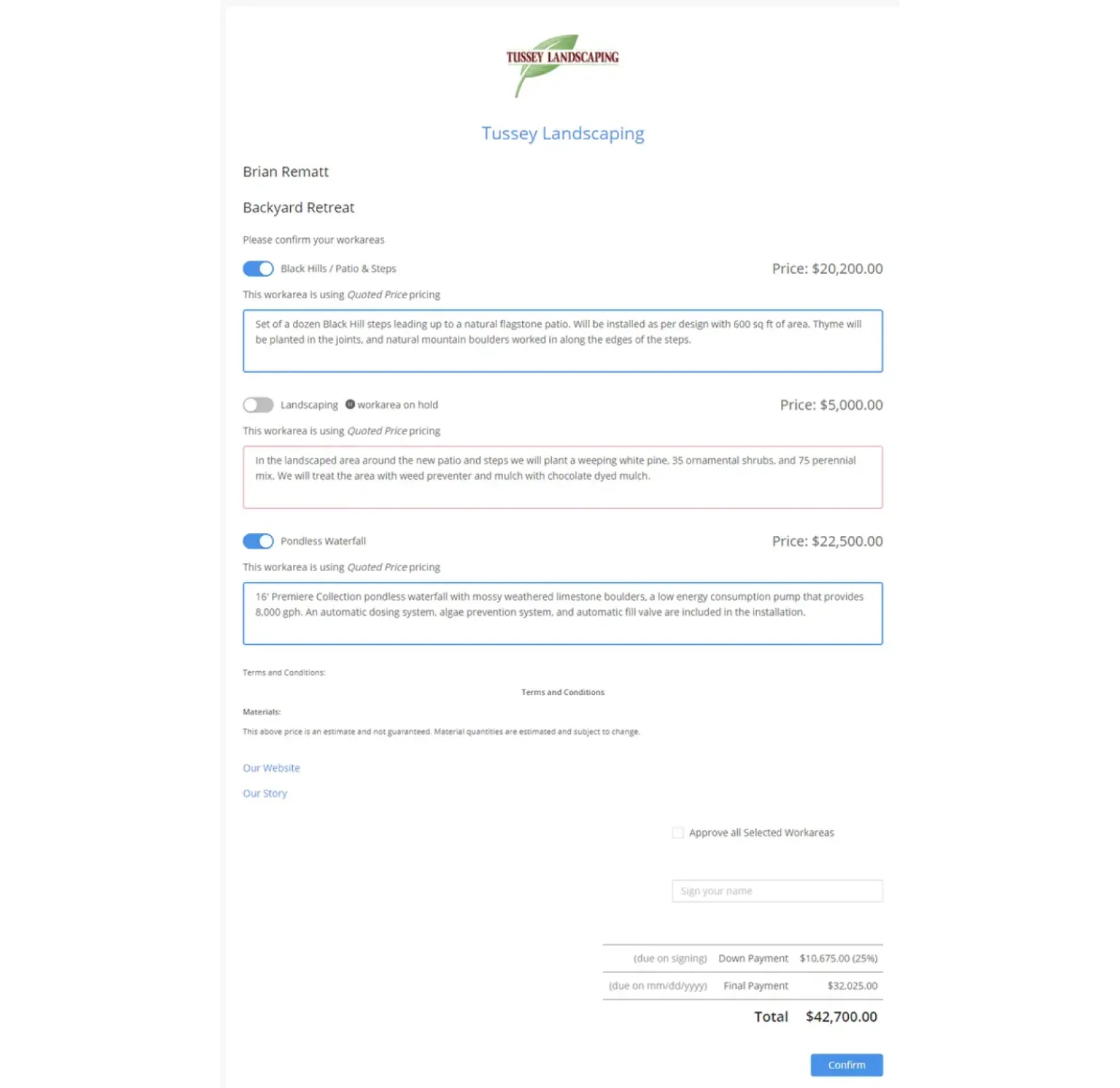
Non-transparent pricing. SynkedUp supports three pricing types, each with a different cost structure. Existing proposals listed the pricing types but didn’t explain what they meant. That lack of transparency led to confusion and distrust: clients couldn’t verify whether estimates were reasonable or question specific line items, because the breakdown wasn’t visible.
The three pricing types
- Quoted: a fixed price for all labor and materials.
- Time & Materials: an estimated cost that may change based on actual usage.
- Per Visit: a set price charged only when work is completed, like mowing or snow removal.
Challenge
Designing for two timelines
The codebase couldn’t take a full redesign yet, so we designed two versions at once.
Beyond the UX problems, our team faced a significant technical constraint: SynkedUp’s existing codebase couldn’t support a complete redesign immediately. The development team needed time to rebuild infrastructure.
That meant designing two parallel solutions, and careful component design so both versions stayed aligned while serving different implementation timelines.
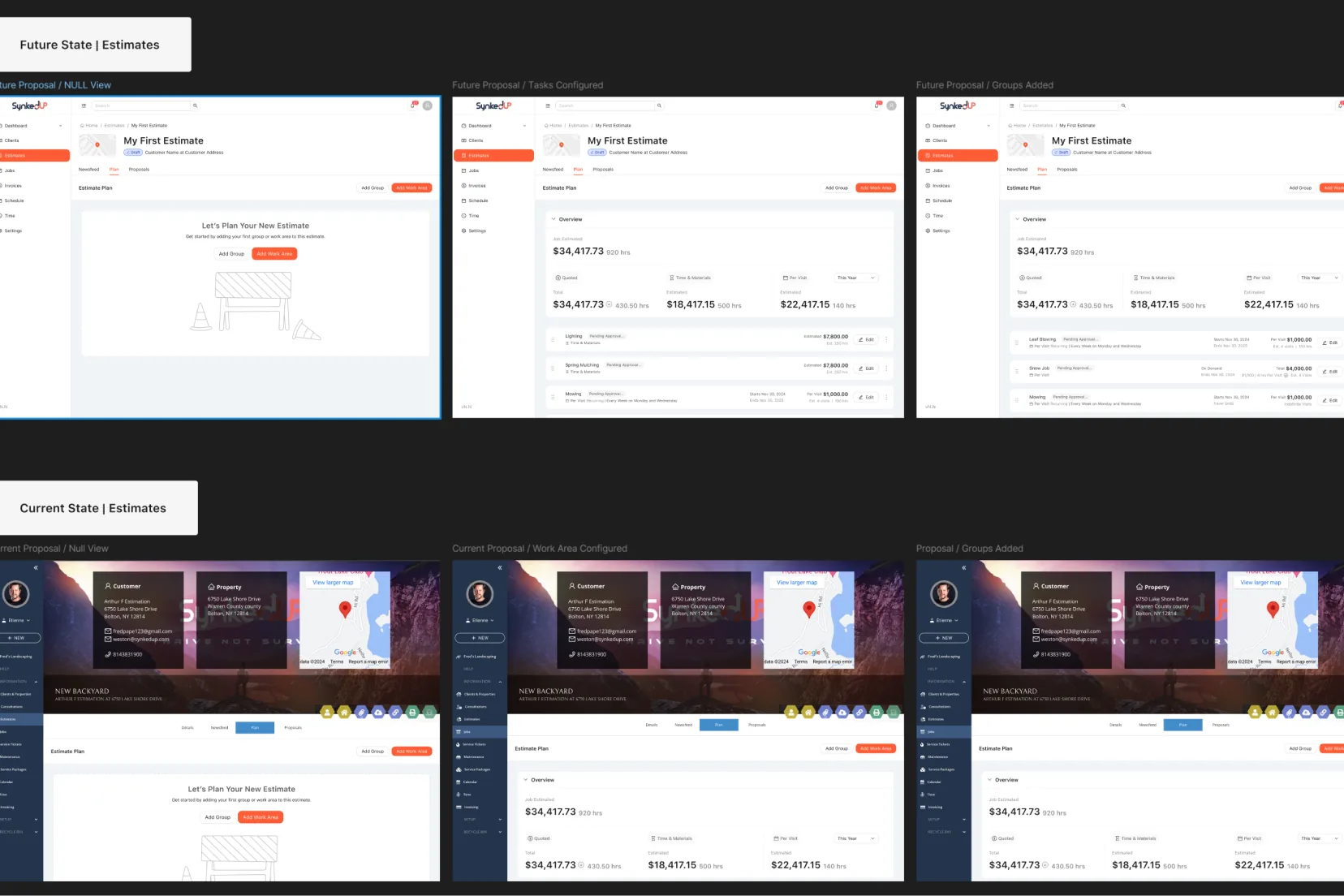
- Future state: a complete redesign using the Ant Design System, with modern UI patterns and streamlined interactions.
- Current state: a phased approach that keeps the existing UI skeleton but introduces the new functionality, so the team could improve incrementally while rebuilding the system underneath. This is the version that shipped.
Process
Component nesting and page templates
One base component, two visual systems: change it once, update both.
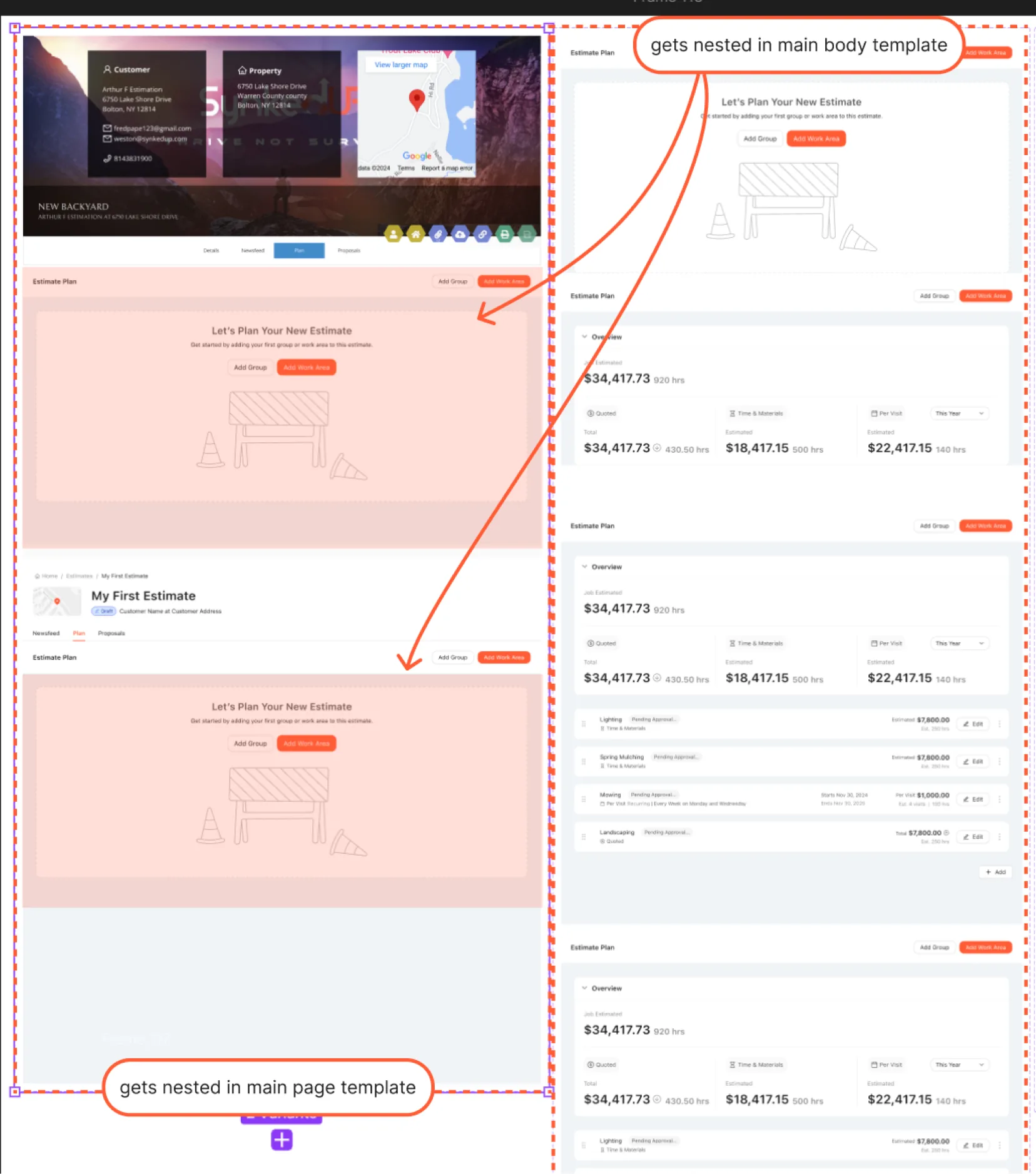
To make the most of the two-track approach, we built page templates so both versions shared the same base components. That way, a change only had to be made in one place.
My role was making sure components worked consistently across both tracks: same functionality, same interaction patterns, different visual systems. Working across two parallel design systems taught me to think systematically about component architecture rather than designing individual screens.
Hierarchy and clear pricing
Groups → work areas → items, with every pricing type explained.
The core insight was that contractors needed to organize work hierarchically. Having only work areas gets unmanageable at scale. Our team introduced the concept of groups.
Groups must share a pricing type so their totals calculate correctly. There are three main pricing types, and each can also be recurring, meaning the work area gets rescheduled automatically.
- Groups: collections of related work areas with the same pricing type.
- Work areas: individual tasks with related items.
- Items: materials and labor within a work area, like “10 tons topsoil” or “42 hours labor.”
How each pricing type is explained in the proposal
- Quoted: the number shown is the Total. It’s a flat rate for the job.
- Time & Materials: the number shown is an Estimate of labor and material costs, so the final charge might be a little more or less depending on how the job goes.
- Per Visit: the number shown is either the Per Visit cost, or an Estimate based on the expected number of visits, so the final charge might be a little more or less depending on how many visits happen.
Solution
Drag-and-drop estimate creation
Contractors build estimates the way they think about the job.
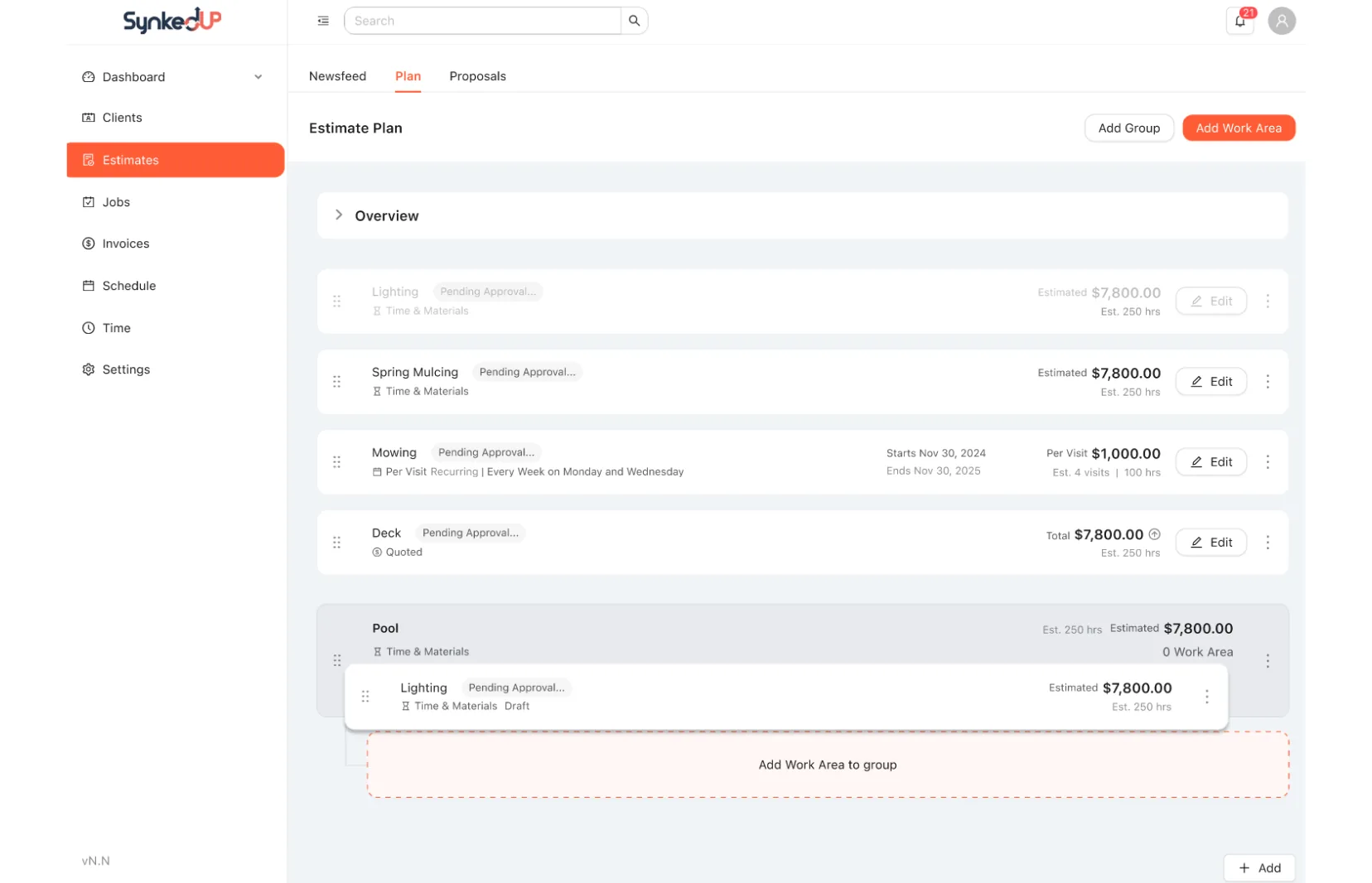
We introduced a new visual interface for building estimates that made hierarchical organization intuitive. Contractors can now:
- Create groups: collections of work areas with the same pricing type.
- Add work areas to groups by dragging and dropping.
- Manage items (materials and labor) within work areas.
- Reorder everything visually to match how they think about the project.
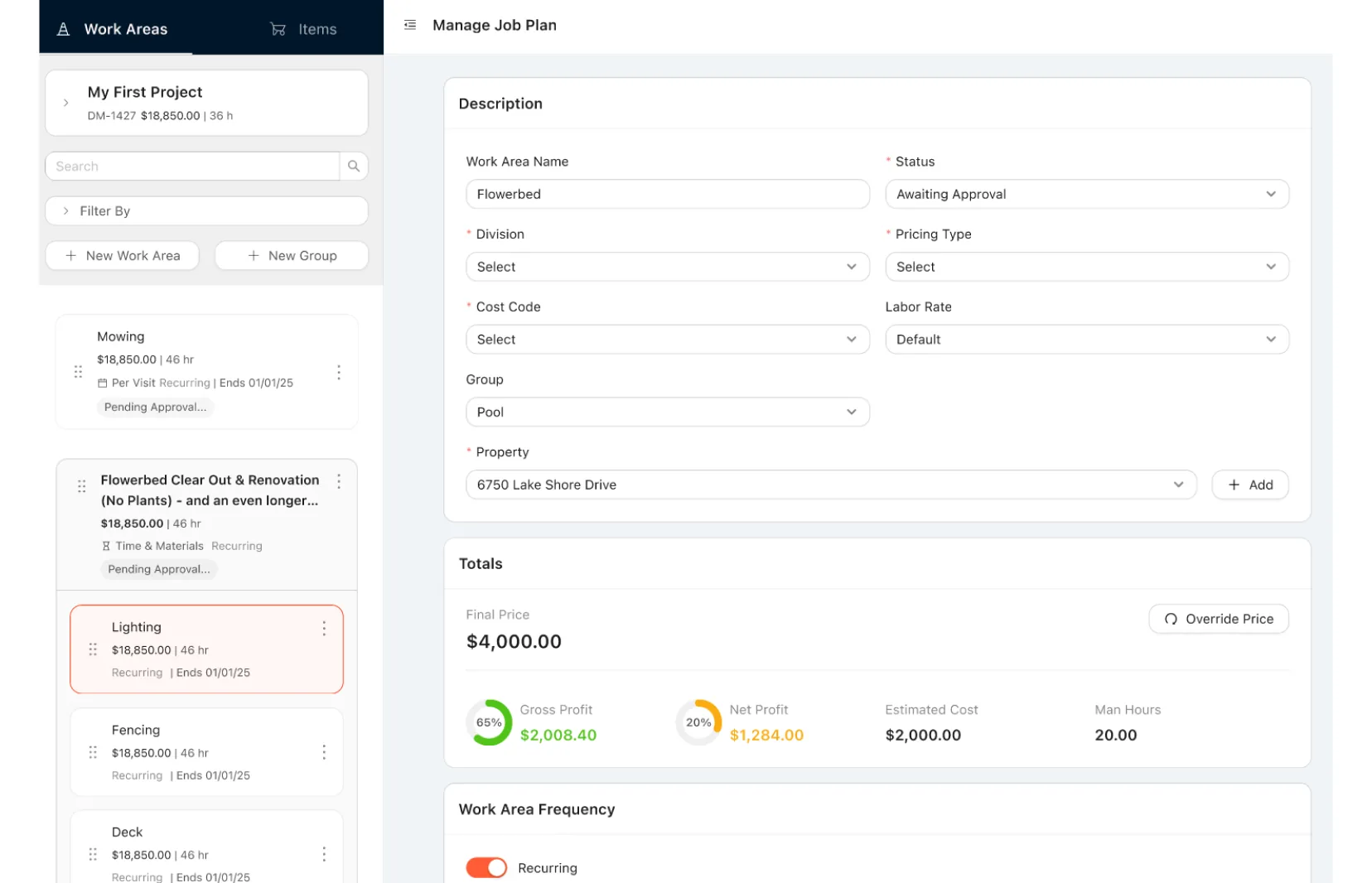
The Manage Work Area drawer
Every detail of a work area, without losing your place in the job.
We still wanted to preserve all the functionality of the previous design. To do that, I created the Manage Work Area drawer, where contractors configure every detail of a specific work area.
The sidebar also shows job summary info (total hours, price, customer details) so contractors don’t lose context. We advocated for auto-save so users could switch between work areas without losing progress.
- Quick-switch sidebar: move between work areas without closing the drawer.
- Context-aware item catalog: when adding materials, the sidebar switches from Work Areas to Items, showing the catalog without leaving the drawer.
- Collapsible sidebar: collapse it entirely for a full-screen view when configuring complex work areas with many items.
The Proposal Management drawer
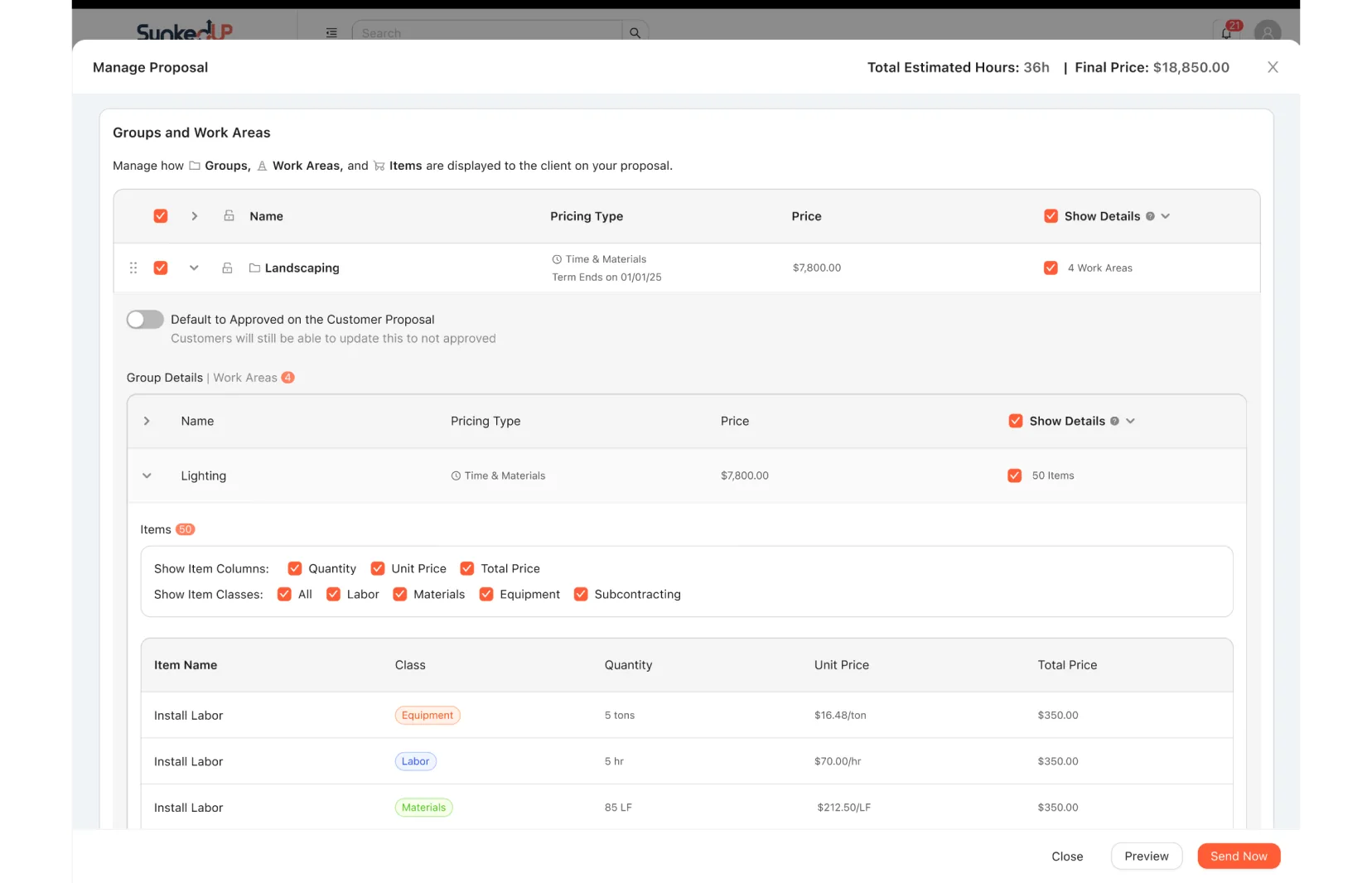
Contractors choose exactly how much detail each client sees.
When contractors prepare proposals, they now control what level of detail clients see. This flexibility matters because some contractors want full transparency with detailed breakdowns, while others prefer simplified totals. The system supports both.
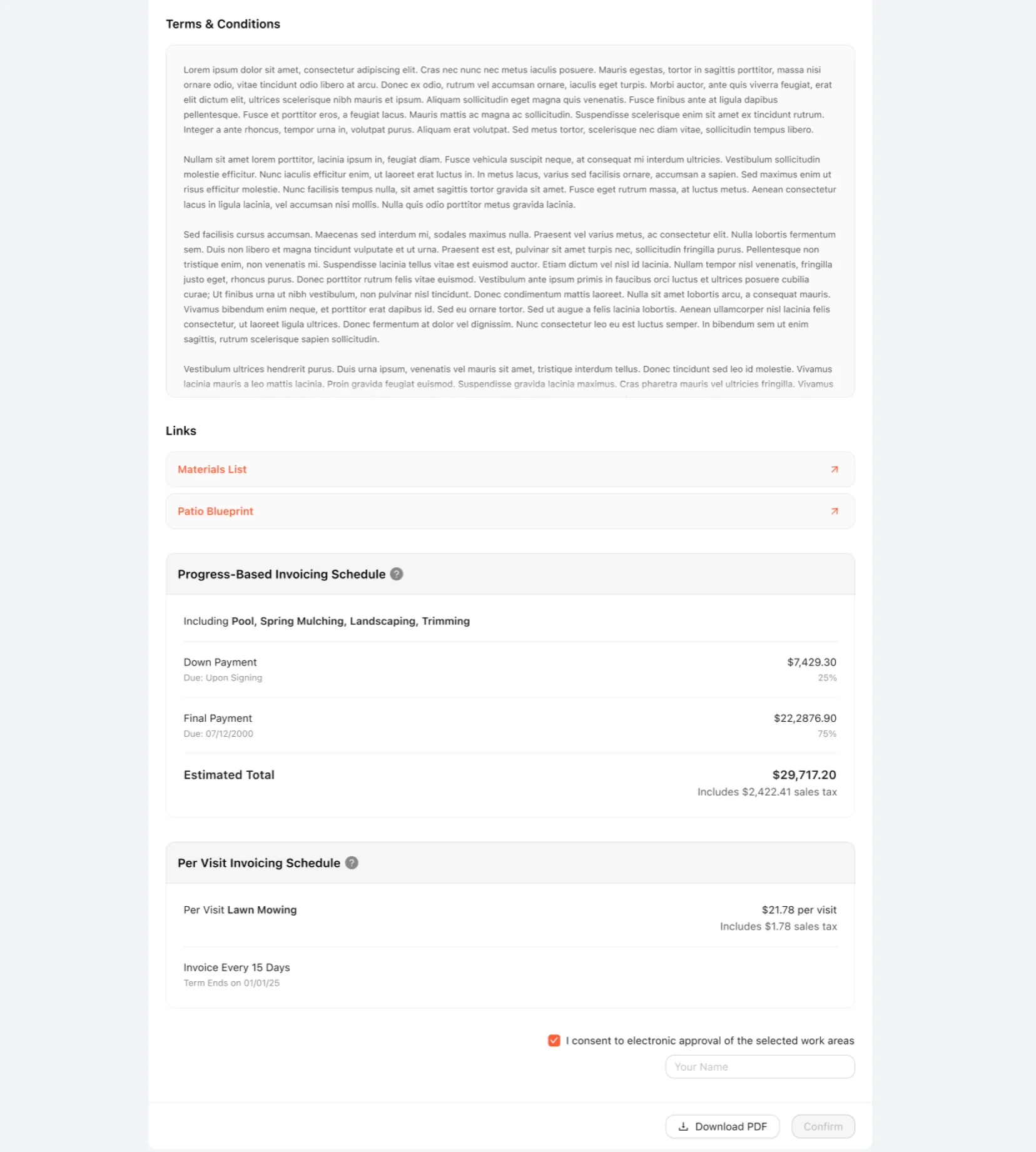
We also created invoicing sections specific to each pricing type, so it’s clear to the contractor, and on the proposal, how each part of the job is charged. Quoted and Time & Materials work areas have a choice of three payment schedules; Per Visit work areas get a time frame based on how often the service is requested.
- Show just group totals (e.g. “Pool: $7,800”), or expand to show work area breakdowns.
- Include or hide line item details (materials, labor hours, quantities).
- Select which groups and work areas appear in the proposal.
- Set the default approval status for each item.
A clean client-facing proposal
Clients start with the big picture and drill in only to verify.
The redesigned proposal presents information hierarchically, with expandable sections. Clients see groups with totals and brief descriptions. They can expand a group to see its work areas and, for maximum transparency, drill into a work area to see item costs.
A tip next to the payment schedule explains how each pricing type is paid, followed by the relevant work areas, the invoice schedule, and the total.
Results
Results and impact
Launched January 2025, and quickly accepted as a better experience.
The redesigned proposal system launched in January 2025 and is now used by landscape contractors managing estimates and client negotiations. It was a big change from the previous system, so the company created a video onboarding for the new experience. There was initial pushback from users, but it was quickly accepted as a better experience.
What changed, for whom
System adoption
- The new hierarchy (groups → work areas → items) was fully implemented.
- A drag-and-drop estimate builder replaced the form-based workflow.
- Client-facing proposals support three levels of detail: groups, work areas, and items.
- Pricing type explanations are built in throughout the proposal.
For contractors
- Organize 20+ work areas into logical groups in minutes, instead of managing overwhelming flat lists.
- Adapt proposals to each client: just totals for clients who want simplicity, or line-item costs for clients who want full transparency.
- The collapsible work area drawer with auto-save ended the frustration of losing changes when switching between work areas.
For clients
- Clear explanations of what each pricing type means, built into the proposal.
- Expandable groups: start with a high-level overview and drill into details only to verify costs.
- Toggles on individual work areas make approving or rejecting straightforward.